

The straightforwardly named Drum Track, new to Cubase Pro 14, offers more than just a new Track type and Pattern Editor – it also introduces the very versatile Drum Machine. This September, enjoy up to 40% off all Cubase versions, updates, upgrades, and crossgrades. Find out more here.
We examined programming the Pattern Editor here, and given its tight integration with the Drum Machine, it will make another appearance below. However, this time, we’re going to focus on sound generation and editing, from loading a preset to building a kit from scratch.
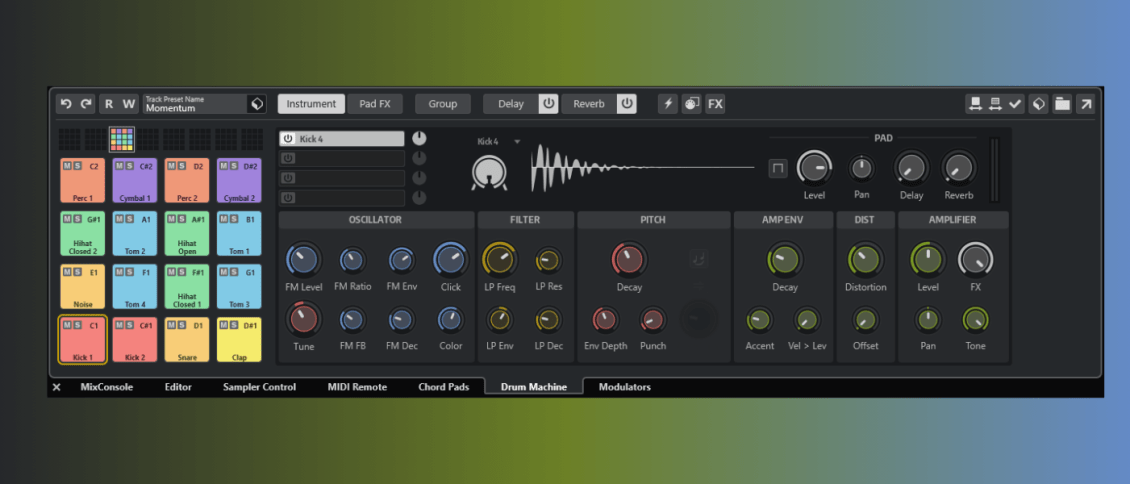
The Drum Machine is a one-shot playback sampler and percussion synthesiser, centred around a series of 4×4 pad matrices, a Toolbar, and an Edit section.
 Hit Me With The Basics
To access the Drum Machine, you will need to create a Drum Track.
Select Add Track from the main Project menu or press ‘+’ on the Project page.
In the dialogue box, ensure that Drum is highlighted, and Pattern Event is shown for the Event type. This allows us to create patterns easily using the new step sequencer functionality.

The Drum Machine tab should be highlighted in the Lower Zone, and you’ll see a rather grey-looking GUI window.

On the left, you’ll find the Drum Pad section, with 8 banks of 16 pads.
Banks are selected at the top, with pads below.

At the top is the toolbar, for quick access to presets, editing, effects and audition functions.

The main editing area is the primary focus for creating, layering and editing the parameters associated with the selected drum pad.
 Loading and Editing a Preset
Since the new Drum Machine has so many features, a helpful first step is to load one of the included preset kits. Here, we’ve gone for a classic old-school house vibe in the form of ‘Detroit Beginnings’. We also used it in the Pattern Editor tutorial (here).

Hitting any of the pads will trigger its associated sound, but you can also play them via MIDI; the trigger number is listed at the top right of each one.
If you jump to the Lower Zone’s Editor tab, you can program a beat using its step grid. Notice how the lane colours match the Drum Machine’s pad colours.
We’ve created a simple beat to get things started.

Now head back to the Drum Machine, where we can start tweaking.
We’ve muted a few of the pads and selected the Clap.
This one uses an analogue-style synth model (‘Clap1’), and there are a bunch of parameters we can play with. Here we’ve increased the Tail level and Decay and raised the filter Cutoff.

Each pad can, in fact, trigger four layers simultaneously, and they can be samples or any one of the built-in synth models.

The Hot Swap Preview button allows you to audition a sound for a pad or layer before committing to it. Here we’re using the Media Browser to find samples to replace the current clap.

Click on Apply Hot Swap to swap in the new sample.

We added a bit of reverb to this using the Send FX.

Each pad also gets its own set of Insert effects accessible via the PadFX button.

There are numerous post-processing options available.
Creating Your Own Kit
While dragging and dropping samples offers an easy way to build your own kit, there is plenty of fun to be had by exploring the extensive range of synthesis options available.
The ‘Detroit Beginnings’ preset used above was crafted from some familiar-sounding X0X-style synthesis layers. Let’s begin creating our own.
Right-click any pad and select Reset All Pads to clear the current kit.

Click on the pad labelled ‘C1’, then select ‘Kicks’ and then ‘Kick 2’.

It can then be tweaked by adjusting its parameter controls. These vary depending on the synthesis model selected.

Next, we’ve added a second Kick pattern, triggering another pad using the ‘Kick 3’ model.

And now Rimshot 1 with some added reverb.

Then ‘Closed Hat 1’ and a bit of ‘Clap 2’

Another layer using the ‘Tom 2’ engine for our 2nd Kick.

And finally, back to our 1st for some PadFX – Distortion and Limiting. We’ve muted some elements in the audio clip.

So there you have it, a swift run-through of some of the features and functions available in the new Cubase 14 Drum Machine. There’s so much to explore beyond what we can cover here. For a detailed explanation of every aspect, be sure to visit the online help here.
If you like this article, you might enjoy:
- Cubase 14 Modulators Are Redefining Creative Automation
- Tip & Tricks For Getting Started With Cubase 14’s Pattern Editor
Discover Cubase Pro 14 on the official website. This September, enjoy up to 40% off all full versions, updates, upgrades, and crossgrades. Find out more here.
[social-links heading=”Follow Attack Magazine” facebook=”https://www.facebook.com/attackmag” twitter=”https://twitter.com/attackmag1″ instagram=”https://www.instagram.com/attackmag/” youtube=”https://www.youtube.com/user/attackmag” soundcloud=”https://soundcloud.com/attackmag” tiktok=”https://www.tiktok.com/@attackmagazine”] [product-collection]








 Global deal sees small and medium-sized businesses gain access to personalized GenAI ads and tools to test their effectiveness before launch LONDON, UK; LOS ANGELES, CALIFORNIA – Small and medium-sized businesses (SMBs) can now create personalized AI-generated ad campaigns and optimize them for maximum emotional and business impact, thanks to a new partnership between AdGreetz, […]
